The Mouse That Almost Wasn't: Doug Engelbart's "Mother of All Demos"
On December 9, 1968, Doug Engelbart demonstrated the computer mouse, hypertext, video conferencing, and the graphical user interface—technologies that wouldn't become mainstream for another 20 years. It was the most important tech demo in history, and almost nobody noticed.
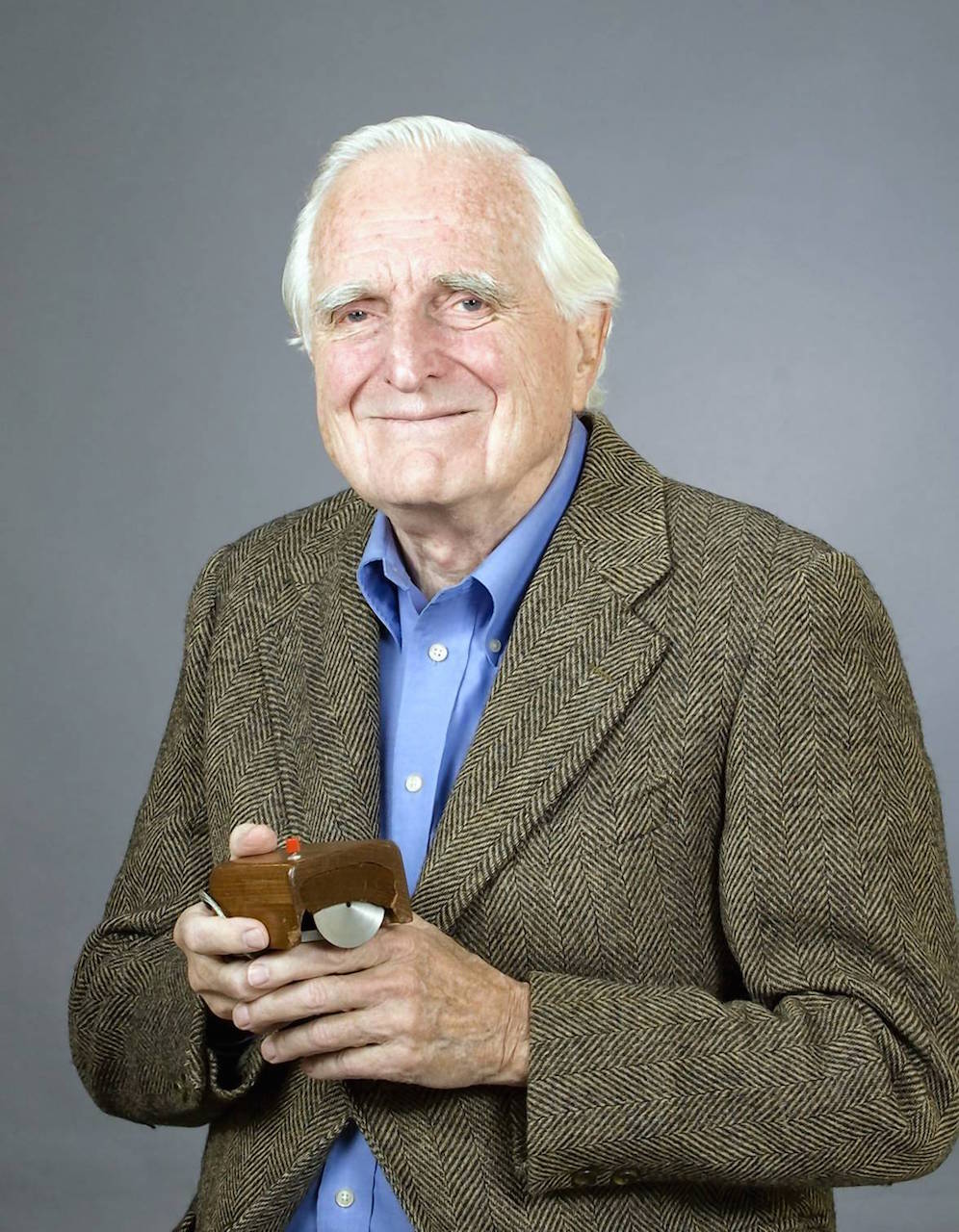
Table of Contents
- December 9, 1968: The Demo That Changed Everything
- What Engelbart Actually Showed
- The Mouse: A Wooden Block with Two Wheels
- The NLS System: 20 Years Ahead of Its Time
- The Technical Achievement
- Why It Was Called the "Mother of All Demos"
- The Tragic Part: Nobody Cared
- Xerox PARC: The Ideas Get Stolen (Sort Of)
- The Long Road to Adoption
- Engelbart's Vision vs. What We Got
- The Legacy
- Conclusion
December 9, 1968: The Demo That Changed Everything
Picture this: It's 1968. Most computers are room-sized machines accessed through teletype terminals—basically electric typewriters. There are no screens, no graphics, no interaction beyond typing commands and waiting for the printout. Computing is batch processing: you submit your job, wait hours or days, and hope it worked.
In San Francisco, at the Fall Joint Computer Conference, a 43-year-old engineer named Douglas Engelbart is about to give a 90-minute presentation that will show the future of computing. Not speculate about it. Not theorize. Actually demonstrate it, live, in front of 1,000 computer professionals.
The stage setup was unprecedented: - A 22-foot-high video screen - A camera focused on Engelbart's face - Another camera pointed at his hands and keyboard - A microwave link connecting to his lab 30 miles away at Stanford Research Institute (SRI) - A homemade video switching system to show multiple video feeds simultaneously
Engelbart sat at a custom console, his face projected above him like a giant oracle. On the desk in front of him: a keyboard, a strange wooden device with two wheels, and a five-key chorded keyset.
For the next 90 minutes, he would demonstrate technologies that the world wouldn't see in commercial products until the 1980s and 1990s—some of which we're still perfecting today.
What Engelbart Actually Showed
The demo showcased the NLS (oN-Line System), a collaborative computing system Engelbart's team had been developing since 1962. Here's what audiences saw in 1968:
The Computer Mouse
Engelbart moved a small wooden block across the desk, and a cursor moved on the screen in response. He could point at things. Click on them. Select text by clicking and dragging.
This was revolutionary. In 1968, the standard way to interact with a computer was to type commands. There was no concept of "pointing" at something on a screen.
Hypertext and Hyperlinking
Engelbart showed documents with embedded links. Click on a word, and you'd jump to related information. Click again, and you'd go deeper. He could navigate through interconnected documents instantly.
This was 23 years before the World Wide Web. Tim Berners-Lee was 13 years old.
Multiple Windows
The screen showed multiple windows of information simultaneously. Engelbart could resize them, move them around, and switch between them.
This was 16 years before the Macintosh, 17 years before Windows 1.0.
Real-Time Collaboration
Most dramatically, Engelbart's colleague Bill English appeared on screen from the SRI lab 30 miles away. They worked on the same document simultaneously, seeing each other's changes in real-time. They could point to things on each other's screens, have a video call, and edit together.
This was video conferencing, screen sharing, and collaborative editing—in 1968. It would be decades before Skype, Zoom, and Google Docs.
Other Innovations
- Outline processing: Collapsible hierarchical documents (like modern outline apps)
- Context-sensitive help: Press a key and get help specific to what you're doing
- Version control: Track changes and revert to previous versions
- Integrated email and messaging: Communication built into the system
- Mixed text and graphics: Documents that combined both in a fluid interface
The Mouse: A Wooden Block with Two Wheels
The mouse itself has an interesting origin story. Engelbart needed a way to point at things on a screen efficiently. His team tested multiple alternatives:
The Competitors
Light pen: You touched the screen directly with a pen. Problems: Your arm gets tired (now called "gorilla arm"), and your hand blocks the screen.
Trackball: A ball in a socket that you rolled with your fingers. Problems: Required precise fine motor control, was slow for large movements.
Joystick: Like a game controller. Problems: Imprecise, hard to keep steady.
Knee control: Yes, really. A device operated by your knees under the desk. Problems: ... everything.
Tablet with stylus: Like a modern drawing tablet. Problems: Expensive, required looking away from the screen.
Why the Mouse Won
Engelbart's team ran studies comparing all these devices for speed and accuracy. The mouse won on almost every measure:
- Fastest for moving the cursor across the screen
- Most accurate for clicking on targets
- Least fatigue over extended use
- Easiest to learn for new users
- Cheapest to build (important for commercialization)
The First Mouse
The original mouse was built by Bill English, Engelbart's chief engineer, in 1964. It was:
- Made of wood
- About the size of a brick
- Had two perpendicular wheels (not a ball)
- Had a single button
- Connected by a thick cable (thus "mouse" with a "tail")
- Cost about $300 to build (roughly $3,000 in today's dollars)
The two wheels created a problem: they couldn't roll diagonally smoothly. Moving the mouse at a 45-degree angle caused it to judder. Later designs solved this with a trackball mechanism.
Engelbart filed a patent for the mouse in 1967, which was granted in 1970. The patent called it an "X-Y Position Indicator for a Display System." Much less catchy.
The NLS System: 20 Years Ahead of Its Time
NLS wasn't just a collection of clever features. It was a complete reimagining of how humans could work with computers.
The Philosophy: Augmenting Human Intellect
Engelbart's goal wasn't to make computers easier to use in the traditional sense. He wanted to make humans more capable of solving complex problems. His 1962 paper "Augmenting Human Intellect" outlined this vision:
"By 'augmenting human intellect' we mean increasing the capability of a man to approach a complex problem situation, to gain comprehension to suit his particular needs, and to derive solutions to problems."
He wasn't interested in making computers that could do things for you. He wanted to build tools that let you do things you couldn't do before—like a bicycle for the mind, as Steve Jobs would later say.
The Learning Curve
This philosophy had a cost: NLS was hard to learn. It used:
- A keyboard for typing
- A mouse for pointing and selecting
- A five-key chorded keyset operated by the left hand for entering commands quickly
The chorded keyset was like a piano for computing. Pressing different combinations of the five keys entered different commands. Experienced users could operate NLS incredibly fast—much faster than using menus or typing command names.
But the learning curve was steep. It took weeks to become proficient. Engelbart believed this was fine—learning to play piano also takes time, but the investment pays off.
The Architecture
NLS was built on a revolutionary architecture:
Client-server model: Users ran "thin clients" on their terminals that connected to a central server. This was decades before web browsers and cloud computing.
Shared database: All documents lived in a central repository that multiple users could access simultaneously.
Real-time updates: Changes appeared immediately for all users viewing the same document.
Structured documents: Documents weren't just text—they had semantic structure (headings, lists, links) that the computer understood.
This architecture required significant computing resources. The system ran on an SDS 940 mainframe computer that filled an entire room and cost hundreds of thousands of dollars.
The Technical Achievement
The 1968 demo wasn't just impressive because of what it showed—it was impressive because it worked at all.
The Video System
Engelbart needed to show his face, his hands, his screen, and his remote collaborator simultaneously. This required:
- A custom video mixer (built from scratch)
- Picture-in-picture capability (decades before this was common)
- Split-screen and quad-screen views
- Real-time switching between camera angles
This was all analog video, switched manually by Engelbart's wife, who operated the production from a control booth.
The Network Connection
The connection to SRI, 30 miles away, was a microwave link with a homemade modem. This had to carry:
- Video from the remote lab
- Keyboard and mouse inputs
- Real-time updates to the shared documents
- Audio for communication
All of this over a connection that would be considered impossibly slow by today's standards. The fact that it worked at all, live, in front of an audience, was remarkable.
The Preparation
Engelbart's team spent months preparing:
- Rehearsals: They practiced the entire demo dozens of times
- Backup systems: Multiple redundant connections in case something failed
- Custom hardware: They built components that didn't exist commercially
- Software refinements: Polishing NLS to handle the pressure of a live demo
Nothing like this had ever been attempted before. There was no template to follow, no best practices to consult.
Why It Was Called the "Mother of All Demos"
The term "Mother of All Demos" wasn't used in 1968. It was coined decades later by technology historians trying to capture the demo's significance.
The name stuck because:
It showed the future: Almost every element of modern computing was present: mice, GUIs, hypertext, video conferencing, collaborative editing, windows, help systems.
Nothing since has been as visionary: Tech demos typically show incremental improvements. This showed a complete reimagining of computing. The iPhone reveal in 2007 comes close, but even that was building on decades of touchscreen and smartphone research.
It birthed an entire industry: Many people in the audience went on to create the personal computer revolution. The demo directly influenced Xerox PARC, Apple, Microsoft, and the entire GUI paradigm.
It was technically flawless: Despite the complexity and risk, everything worked. No crashes, no technical difficulties, no awkward moments. It was a master class in live demo execution.
The Tragic Part: Nobody Cared
Here's the heartbreaking truth: the immediate reaction to the demo was... polite applause.
Why the Audience Didn't Get It
The 1,000 computer professionals in the audience in 1968 were mostly focused on:
- Batch processing efficiency
- COBOL and FORTRAN programming
- Mainframe performance optimization
- Punch card systems
They weren't thinking about personal computing, collaborative work, or human-computer interaction. Those concepts barely existed.
What Engelbart showed was so far ahead of its time that most people couldn't contextualize it. It was like showing a smartphone to someone in the 1960s—they'd see the technology but couldn't imagine how it would fit into their lives.
The Reviews
Contemporary reviews were mixed and often confused:
- Some praised the technical achievement but questioned its practicality
- Others focused on the cost (the system required a massive mainframe)
- Many simply didn't understand what they'd seen
There were no viral videos in 1968. No Twitter to spread the word. The demo happened, got written up in a few trade journals, and faded from immediate memory.
Funding Challenges
Despite the demo's brilliance, Engelbart struggled to secure continued funding. His sponsor, ARPA (Advanced Research Projects Agency), was more interested in networking (which led to ARPANET) than human-computer interaction.
The NLS system continued to be used internally at SRI and by a small number of government and research organizations, but it never achieved commercial success or widespread adoption.
Xerox PARC: The Ideas Get Stolen (Sort Of)
In the early 1970s, Xerox Corporation created PARC (Palo Alto Research Center) to invent "the office of the future." They hired many of the brightest minds in computing.
Several researchers who attended or heard about Engelbart's demo ended up at Xerox PARC, including:
- Alan Kay: Who worked on the Dynabook concept (portable personal computers)
- Butler Lampson: Who helped design the Alto computer
- Charles Simonyi: Who later went to Microsoft and created Word and Excel
The Xerox Alto (1973)
PARC created the Alto, which borrowed heavily from Engelbart's ideas:
- Used a mouse
- Had a graphical user interface
- Supported multiple windows
- Included a bitmap display (every pixel individually controllable)
- Could run multiple applications
The Alto was more user-friendly than NLS—it used icons and menus instead of Engelbart's chorded keyboard. This made it easier to learn but potentially slower for expert users.
Xerox built about 2,000 Altos for internal use and research institutions. They never sold it commercially, one of the greatest missed opportunities in business history.
Steve Jobs Visits PARC (1979)
In 1979, Apple negotiated a visit to PARC in exchange for allowing Xerox to invest in Apple. Steve Jobs and a team of Apple engineers saw the Alto and its GUI.
Jobs famously said: "They showed me three things, but I was so blinded by the first one I didn't even see the other two. The first one was graphical user interface. I thought it was the best thing I'd ever seen in my life."
This visit directly inspired the Apple Lisa (1983) and Macintosh (1984).
Bill Gates Sees the Mac (1983)
Microsoft was developing applications for the Macintosh before it launched. Bill Gates saw the Mac's GUI and realized where the industry was heading.
This led to Windows 1.0 (1985), which brought GUI computing to IBM-compatible PCs.
The Long Road to Adoption
The technologies Engelbart demonstrated in 1968 took decades to become mainstream:
The Mouse: - 1968: Demonstrated by Engelbart - 1973: Xerox Alto (research prototype) - 1984: Macintosh (first mass-market computer with a mouse) - 1985: Windows 1.0 (brought mouse to PCs) - 1990s: Became standard on all computers
Graphical User Interfaces: - 1968: NLS - 1973: Xerox Alto - 1983: Apple Lisa ($10,000, commercial failure) - 1984: Macintosh (successful but expensive) - 1985: Windows 1.0 (primitive but accessible) - 1995: Windows 95 (mainstream adoption)
Hypertext: - 1968: NLS hyperlinks - 1987: HyperCard (Mac application) - 1991: World Wide Web invented - 1993: Mosaic browser (made web accessible) - Late 1990s: Web becomes mainstream
Video Conferencing: - 1968: NLS demo - 1970s-80s: Expensive corporate systems - 1990s: Early internet video calling (terrible quality) - 2000s: Skype improves quality - 2010s: Zoom, Teams become mainstream - 2020: COVID-19 makes it ubiquitous
Collaborative Editing: - 1968: NLS real-time collaboration - 1990s: Email attachments (not real-time) - 2000s: Wikis (clunky collaboration) - 2006: Google Docs (true real-time editing) - 2010s: Becomes standard expectation
It took 20-50 years for Engelbart's 1968 demo to become everyday reality.
Engelbart's Vision vs. What We Got
Engelbart had mixed feelings about how his ideas were implemented.
What He Hoped For
Engelbart envisioned computers as tools for:
- Augmenting human intellect: Making people smarter and more capable
- Solving complex problems: Tackling climate change, poverty, disease
- Collaborative work: Teams working together seamlessly on hard problems
- Continuous improvement: Systems that helped users become more skilled over time
What We Actually Got
While we adopted the technologies, Engelbart felt we missed the deeper vision:
Ease over power: Modern GUIs prioritize ease of use over expert capability. Anyone can use a computer, but the tools don't make us dramatically more capable at complex thinking.
Entertainment over augmentation: Computers became primarily entertainment and communication devices rather than intellectual augmentation tools.
Individual over collective: We focused on personal productivity rather than collective intelligence and collaboration.
Consumption over creation: Most people consume content rather than create or solve problems.
Engelbart's Later Years
Engelbart continued working on his ideas through the Bootstrap Institute, which he founded in 1988. He gave talks, mentored researchers, and argued that we'd lost sight of the original vision.
He received numerous awards: - National Medal of Technology (2000) - Turing Award (1997)—computer science's highest honor - Lemelson-MIT Prize (1997)—$500,000 for innovation
But he remained somewhat frustrated that the world had adopted his tools without embracing his philosophy.
Engelbart passed away in 2013 at age 88. In his final years, he saw the rise of smartphones, social media, and cloud computing—technologies that used his inventions but in ways he hadn't fully anticipated.
The Legacy
Despite his mixed feelings, Engelbart's influence is impossible to overstate.
Direct Technical Legacy
Every time you: - Move a mouse cursor - Click on a link - Open multiple windows - Video call a colleague - Edit a document with others in real-time - Use context-sensitive help
You're using technology that traces directly to the 1968 demo.
Philosophical Legacy
Engelbart's ideas about human-computer interaction influenced generations of researchers:
- Alan Kay's Dynabook and object-oriented programming
- Ted Nelson's Xanadu project (hypertext before the web)
- Tim Berners-Lee's World Wide Web
- Google's mission to organize the world's information
- Modern collaboration tools like Notion, Figma, and Linear
The Demo as Art Form
The "Mother of All Demos" established the tech demo as a crucial form of communication. It showed that demonstrating technology live, with showmanship and narrative, was more powerful than technical papers or static presentations.
This influenced: - Steve Jobs's legendary product launches - Modern TED talks - Startup pitch presentations - The entire culture of "demo or die" in tech
Recognition
The demo footage has been preserved and digitized. You can watch the entire 90-minute presentation online—it's grainy and the technology looks ancient, but the vision remains powerful.
The demo is studied in computer science and human-computer interaction courses worldwide. It's considered required viewing for anyone interested in technology history.
Conclusion
Doug Engelbart's 1968 demo is a study in vision, timing, and the gap between invention and adoption.
He invented the future but lived in the present. He showed what was possible decades before the world was ready to receive it. The technologies he demonstrated—mouse, GUI, hypertext, video conferencing, collaborative editing—eventually changed everything, but not in his timeline and not quite in the way he hoped.
The mouse that almost wasn't is now on billions of desks (and touchpads, and touchscreens). The collaborative system he built is now called the internet and the cloud. The video conferencing he demonstrated is how we attend meetings, see our families, and teach our children.
We live in the world Engelbart showed us in 1968. We just took 50 years to get here.
The tragedy and triumph of the "Mother of All Demos" is that it was both completely ignored and completely prescient. Nobody cared in 1968, but everyone should have. Because everything he showed us came true.
Fun Fact: Engelbart received only about $10,000 from his mouse patent before it expired in 1987—just before the mouse became ubiquitous. The patent was assigned to SRI, which didn't aggressively license it. By the time the personal computer revolution made mice standard, the patent protection was gone. Engelbart never received royalties for one of the most-used inventions in history.
Interested in more computing history? Learn about how DNS saved the internet from a single text file, or discover how ARPANET's first message was "LO" and a crash.