How DNS Saved the Internet: The Phonebook Nobody Thinks About
In 1983, the internet was drowning in a text file. Every computer on the network needed a master list of every other computer's address—and that list was growing too fast to manage. The solution? A distributed phonebook system that runs billions of lookups per second and powers every click you make online.
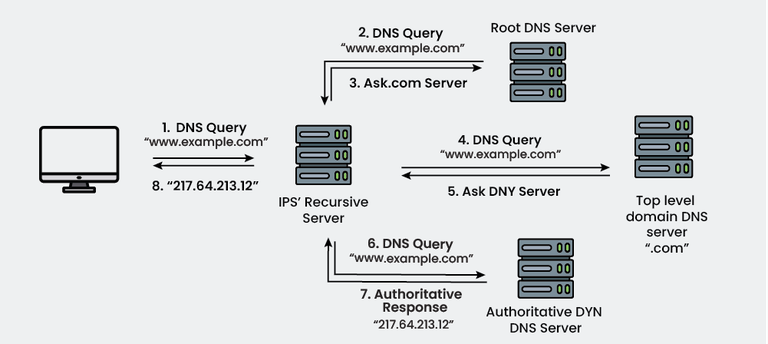
Table of Contents
- The Problem: HOSTS.TXT
- Why a Simple File Couldn't Scale
- The People Who Invented DNS
- How DNS Actually Works
- The Implementation Challenge
- Why DNS Is Hierarchical
- DNS in Action: What Happens When You Type a URL
- The DNS Root Servers
- Modern DNS: Scale and Speed
- When DNS Breaks
- Conclusion
The Problem: HOSTS.TXT
In the early days of the internet (then called ARPANET), every computer on the network had a unique numerical address called an IP address. In the 1970s, these addresses looked like 10.0.0.52 or 128.12.1.3.
But humans don't think in numbers. We think in names. So the early internet pioneers needed a way to map human-readable names (like "sri-unix" or "mit-multics") to machine addresses.
Their solution was beautifully simple: a single text file called HOSTS.TXT.
How HOSTS.TXT Worked
The Stanford Research Institute's Network Information Center (SRI-NIC) maintained the master HOSTS.TXT file. This file was essentially a phonebook—a simple list that looked like this:
10.0.0.52    sri-unix
128.12.1.3   mit-multics
10.1.0.6     ucla-ccn
36.12.0.2    bbn-tenex
Every computer on the network kept a local copy of this file. When you wanted to connect to another computer, your system would:
- Look up the name in your local HOSTS.TXT file
- Find the corresponding IP address
- Connect to that address
The process for updating this file was charmingly manual:
- A system administrator would email changes to SRI-NIC
- SRI-NIC would manually edit the master HOSTS.TXT file
- The updated file would be posted to a specific location
- Administrators across the network would use FTP to download the latest version
- They would manually replace their old HOSTS.TXT file with the new one
This system worked fine when the ARPANET had 50 computers. Or even 100. But by the early 1980s, the internet was growing exponentially.
Why a Simple File Couldn't Scale
By 1983, the problems with HOSTS.TXT had become critical:
Problem 1: Size and Bandwidth
The file was growing too large. Every new computer added to the network meant another line in the file. With hundreds (soon to be thousands) of computers joining, the file was becoming unwieldy.
Worse, every computer on the network had to download the entire file regularly—even if they only cared about a handful of addresses. As network bandwidth was expensive and limited, this was increasingly problematic.
Problem 2: Update Frequency
The file had to be updated constantly. New computers joined the network daily. IP addresses changed. Machines were decommissioned. Each change required:
- Someone to email SRI-NIC
- SRI-NIC staff to manually edit the file (introducing potential typos)
- The updated file to be published
- Every administrator to notice the update and download it
The time between when a change was made and when it propagated to all machines on the network could be hours or even days. During this time, different computers had different versions of the truth about what addresses existed.
Problem 3: Name Collisions
With a single flat namespace, there was no hierarchy. If UCLA wanted to name a computer "mail" and MIT also wanted to name a computer "mail," they couldn't—names had to be globally unique. This created coordination headaches as the network grew.
Problem 4: Single Point of Failure
SRI-NIC was a bottleneck. If the staff were sick, on vacation, or simply overwhelmed, the entire system slowed down. If SRI-NIC's systems went down, no one could get updates.
As Paul Mockapetris, the inventor of DNS, later recalled: "The HOSTS.TXT system was breaking down. We needed something that could scale, that was distributed, and that wouldn't have a single point of failure."
The People Who Invented DNS
Paul Mockapetris
In 1983, Paul Mockapetris was a researcher at the University of Southern California's Information Sciences Institute (USC-ISI). He had been thinking about the name resolution problem for years.
Mockapetris wasn't the first to recognize the problem—many in the networking community knew HOSTS.TXT was unsustainable. Several proposals had been floated, but none gained traction. Some were too complex, others too limited in scope.
Mockapetris's insight was to create a hierarchical, distributed system. Instead of one central file, information about names and addresses would be spread across many servers around the world. Instead of a flat list, names would be organized in a tree structure.
In November 1983, Mockapetris published RFC 882 and RFC 883, which described the Domain Name System. These technical documents laid out both the conceptual design and the implementation details of DNS.
Jon Postel
Jon Postel, also at USC-ISI and the longtime editor of internet standards (RFCs), was instrumental in shepherding DNS from proposal to reality. As the director of the Internet Assigned Numbers Authority (IANA), Postel had the authority and influence to help make DNS the official standard.
Postel's support was crucial. He understood that for DNS to succeed, it needed to: - Be backwards compatible (old systems using HOSTS.TXT could continue working during the transition) - Be simple enough that administrators would actually implement it - Be robust enough to handle future growth
The Implementation Team
Many others contributed to making DNS real:
- Jeanne Abramson (USC-ISI): Helped with DNS specification and testing
- Mark Lottor (SRI): Created one of the first DNS implementations
- Paul Vixie: Later developed BIND (Berkeley Internet Name Domain), which became the most widely used DNS server software
- The BSD Team at UC Berkeley: Integrated DNS into their Unix distribution, accelerating adoption
How DNS Actually Works
DNS is conceptually simple but technically sophisticated. At its core, it's a distributed database that maps domain names to IP addresses (and other information).
The Hierarchical Structure
DNS organizes names in a tree structure, read from right to left. Consider: www.example.com
                    . (root)
                    |
                   com
                    |
                 example
                    |
                   www
Each level in this hierarchy is called a domain:
- . (the root domain—usually invisible to users)
- com (a top-level domain or TLD)
- example (a second-level domain)
- www (a subdomain or hostname)
Delegation and Distribution
The genius of DNS is delegation. No single server knows about all domains. Instead:
- Root servers know about top-level domains (.com, .org, .edu, .uk, etc.)
- TLD servers know about second-level domains within their TLD (for .com, these servers know about google.com, amazon.com, etc.)
- Authoritative servers for each domain know the specific details about that domain's subdomains and hosts
This means that: - The organization that runs .com doesn't need to know anything about the internal structure of google.com - Google doesn't need to ask permission or notify anyone when they add a new subdomain - The system scales horizontally—more domains means more servers, but no single server gets overwhelmed
Types of DNS Records
DNS doesn't just map names to IP addresses. It stores various types of information:
A Record: Maps a domain name to an IPv4 address
example.com A 93.184.216.34
AAAA Record: Maps a domain name to an IPv6 address
example.com AAAA 2606:2800:220:1:248:1893:25c8:1946
CNAME Record: Creates an alias (one name points to another)
www.example.com CNAME example.com
MX Record: Specifies mail servers for a domain
example.com MX 10 mail.example.com
TXT Record: Stores arbitrary text (often used for verification, security policies, etc.)
example.com TXT "v=spf1 include:_spf.google.com ~all"
NS Record: Delegates a subdomain to specific nameservers
example.com NS ns1.example.com
The Implementation Challenge
Creating the specification was one thing. Getting the entire internet to adopt it was another.
The Transition Period (1983-1987)
For several years, both systems ran in parallel:
- Old systems continued using HOSTS.TXT
- New systems used DNS
- DNS servers were configured to fall back to HOSTS.TXT if a DNS lookup failed
- Some sites maintained both systems simultaneously
This gradual transition was critical. A "flag day" approach—where everyone had to switch at once—would have been chaos.
The Berkeley Connection
A major turning point came when DNS was integrated into BSD Unix (specifically, 4.3BSD released in 1986). Since BSD Unix was widely used at universities and research institutions, this meant thousands of systems adopted DNS relatively quickly.
The DNS resolver library (which handled the client-side lookups) was built directly into the operating system's networking stack, making DNS transparent to applications. Programs didn't need to be rewritten to use DNS—it just worked.
Early Growing Pains
The early days had challenges:
Reliability concerns: What if DNS servers went down? The system included caching—once you looked up a name, you'd remember the answer for a while (typically hours or days), so temporary server outages wouldn't break everything.
Security wasn't a priority: The original DNS specification had minimal security. It was designed for a smaller, more trusted network. This would later lead to vulnerabilities like DNS spoofing and cache poisoning, eventually addressed by DNSSEC (DNS Security Extensions) in the 2000s.
Performance questions: Would a distributed system be slower than just reading a local file? In practice, caching made DNS remarkably fast for frequently accessed sites.
Why DNS Is Hierarchical
The hierarchical structure of DNS wasn't just aesthetically pleasing—it was essential for scalability and administration.
Technical Advantages
Distributed Load: No single server has to know everything. Root servers handle relatively few queries (mostly cached by lower-level servers). Most DNS traffic never reaches the root servers.
Administrative Autonomy: Once you control a domain (like example.com), you can create as many subdomains as you want without asking anyone's permission:
- mail.example.com
- www.example.com
- api.example.com
- dev.staging.example.com
Geographic Distribution: Authoritative DNS servers can be placed anywhere in the world. A company with global operations can have DNS servers on multiple continents, improving response times.
Political Advantages
The hierarchy also solved political problems. Different organizations could control different parts of the namespace:
- The Internet Corporation for Assigned Names and Numbers (ICANN) manages the root zone and TLD assignments
- Individual countries control their country-code TLDs (.uk, .jp, .de, etc.)
- Companies and individuals control their registered domains
- Universities control their .edu domains
This distributed governance model prevented any single organization from having too much power over the internet's naming system.
DNS in Action: What Happens When You Type a URL
Let's trace what happens when you type www.example.com into your browser:
Step 1: Check Local Cache
Your computer first checks if it recently looked up this domain. Modern operating systems cache DNS results for a period specified by the DNS record's TTL (Time To Live).
If found in cache: Done! Total time: ~0 milliseconds
If not in cache: Continue to Step 2.
Step 2: Ask Your Recursive Resolver
Your computer sends a query to its configured DNS resolver—typically your ISP's DNS server or a public DNS service like Google's 8.8.8.8 or Cloudflare's 1.1.1.1.
This resolver is called "recursive" because it will do the work of tracking down the answer for you.
Step 3: Resolver Checks Its Cache
The recursive resolver checks its own cache. Popular domains like google.com are almost certainly cached.
If found: Done! Total time: ~10-50 milliseconds
If not: Continue to Step 4.
Step 4: Query the Root Servers
The resolver contacts one of the 13 root name servers (there are actually hundreds of servers distributed globally, but they use 13 IP addresses via anycast routing).
The resolver asks: "Where can I find information about .com domains?"
The root server responds: "Ask these .com TLD servers:" and provides IP addresses for the .com nameservers.
Time: ~50-100 milliseconds
Step 5: Query the TLD Servers
The resolver contacts a .com TLD server and asks: "Where can I find information about example.com?"
The TLD server responds: "Ask these nameservers:" and provides IP addresses for example.com's authoritative nameservers.
Time: ~50-100 milliseconds
Step 6: Query the Authoritative Servers
The resolver contacts example.com's authoritative nameserver and asks: "What's the IP address for www.example.com?"
The authoritative server responds: "93.184.216.34" along with a TTL (how long this answer is valid).
Time: ~50-100 milliseconds
Step 7: Return the Answer
The resolver caches this answer and sends it back to your computer. Your computer caches it as well.
Your browser can now connect to 93.184.216.34 and load the website.
Total time for first lookup: ~200-400 milliseconds Total time for subsequent lookups (cached): ~0-10 milliseconds
This entire process happens invisibly, billions of times per day, for every website you visit.
The DNS Root Servers
The 13 root name servers (labeled A through M) are the top of the DNS hierarchy. Despite being called "13 servers," there are actually hundreds of physical servers distributed around the world using anycast routing—your query goes to the nearest one.
The Root Server Operators
Different organizations operate the root servers:
- A: VeriSign
- B: University of Southern California (ISI)
- C: Cogent Communications
- D: University of Maryland
- E: NASA
- F: Internet Systems Consortium
- G: U.S. Department of Defense
- H: U.S. Army Research Lab
- I: Netnod (Sweden)
- J: VeriSign
- K: RIPE NCC (Netherlands)
- L: ICANN
- M: WIDE Project (Japan)
Why 13?
The number 13 wasn't arbitrary. In the early 1980s, DNS responses had to fit within a 512-byte UDP packet (the standard at the time). With the data structure requirements of DNS, 13 root servers was the maximum that could fit.
Today, with EDNS (Extension Mechanisms for DNS), packets can be larger, but the 13-name structure remains for backwards compatibility. Instead of adding more root server names, operators deployed more physical servers under the existing 13 names using anycast.
Root Server Resilience
The root servers are incredibly resilient:
- Geographic distribution: Servers on every continent (including Antarctica)
- Anycast routing: Your query automatically goes to the nearest server
- DDoS protection: Sophisticated filtering and capacity to handle massive attack traffic
- Redundancy: Even if several root servers went offline, the system would continue functioning
The root servers handle approximately 10 trillion queries per day worldwide.
Modern DNS: Scale and Speed
Today's DNS infrastructure operates at a scale that would have been unimaginable in 1983.
The Numbers
- 400+ billion DNS queries per day globally (estimated)
- Average query response time: 10-50 milliseconds
- Cache hit rate: Often 80-90% (most queries never leave the local resolver)
- Number of registered domains: Over 350 million
- New TLDs: Over 1,500 top-level domains beyond the original handful (.com, .org, .net, .edu, .gov, .mil)
Performance Optimizations
Modern DNS includes numerous optimizations:
Anycast Routing: The same IP address points to multiple servers in different locations. Your query automatically goes to the nearest one.
Aggressive Caching: Resolvers cache aggressively. Popular sites like google.com are almost never looked up from authoritative servers—they're served from cache.
Prefetching: Browsers often perform DNS lookups for links on a page before you click them, making subsequent navigation feel instant.
DNS over HTTPS (DoH): Encrypts DNS queries to prevent eavesdropping and manipulation, addressing decades-old privacy concerns.
DNS over TLS (DoT): Similar to DoH, provides encryption for DNS queries.
DNSSEC: Cryptographically signs DNS responses to prevent tampering and ensure authenticity.
CDN Integration
Content Delivery Networks (CDNs) use DNS in sophisticated ways:
When you look up www.example.com served by a CDN, the DNS response varies based on:
- Your location: You get an IP address for a server geographically close to you
- Server load: Overloaded servers are automatically deprioritized
- Server health: Failed servers are removed from rotation
- Network conditions: Optimal routing based on current internet conditions
This "intelligent DNS" happens transparently, delivering content faster without any action from users.
When DNS Breaks
Despite its resilience, DNS failures can have dramatic consequences.
Famous DNS Outages
Dyn DDoS Attack (October 2016): A massive distributed denial-of-service attack targeted Dyn, a major DNS provider. The attack, using the Mirai botnet (millions of hacked IoT devices), made major sites including Twitter, Netflix, Reddit, and GitHub unreachable for hours. The websites themselves were fine—but without DNS, browsers couldn't find them.
Facebook Outage (October 2021): A configuration error caused Facebook to withdraw its DNS routes. For several hours, facebook.com, instagram.com, and whatsapp.com effectively disappeared from the internet. The domains existed, but no DNS server could find them. Ironically, Facebook employees couldn't fix it remotely because their internal systems relied on the same broken DNS.
AWS Route 53 Issues (Multiple Incidents): Amazon's DNS service has occasionally had regional failures, affecting thousands of websites and services simultaneously.
The "It's Always DNS" Meme
Among system administrators and DevOps engineers, "It's always DNS" is a running joke—because DNS problems are common, subtle, and can manifest in confusing ways:
- Caching issues: You updated a DNS record, but some users still see the old IP for hours (their resolver cached the old answer)
- Propagation delays: Changes to DNS records take time to spread across the global DNS infrastructure
- TTL mistakes: Set the TTL too high, and changes take forever to propagate. Too low, and you generate unnecessary query load
- Misconfiguration: A typo in a DNS record can break everything in mysterious ways
The joke exists because when something on the internet breaks, checking DNS is often the first debugging step—and it's the culprit surprisingly often.
Conclusion
DNS is one of the internet's great unsung heroes. Every time you send an email, load a website, stream a video, or use an app, DNS is working invisibly behind the scenes, translating human-readable names into machine addresses.
Paul Mockapetris's 1983 design was so well thought out that it still forms the backbone of the internet today—adapted and extended, but fundamentally unchanged. The hierarchical, distributed architecture has scaled from a few hundred computers to billions of devices.
The next time you type a URL and a website loads instantly, take a moment to appreciate DNS: the phonebook nobody thinks about, making trillions of connections per day, ensuring that google.com takes you to Google, not someone's kitchen toaster.
Without DNS, the internet as we know it simply wouldn't exist. We'd be back to memorizing IP addresses—or perhaps, downloading updated HOSTS.TXT files via FTP like some kind of digital stone age.
Fun Fact: The original DNS RFCs (882 and 883) from 1983 were superseded in 1987 by RFCs 1034 and 1035, which remain the core DNS specification to this day. That's nearly 40 years of a standard that still works—a remarkable achievement in technology where most things become obsolete within a decade.
Interested in more internet history? Learn about ARPANET's first message: "LO" and the crash that started the internet, or discover how sudo solved Unix's biggest security problem.